In this article, we explain how our matching engine works and how do you match against dynamic URLs.
Helppier always saves the context of creating the guides, that is, the URL.
However, by default, Helppier will not try to match directly. By default, the guide will be available on all pages through the guides list.
In order to be available in one or more specific pages, you need to enable this option on the guide's settings as displayed below. Click on "Edit" then "Start Guide"
If you want your guide to be available from the guides list, access that option, click on "Specific Page" and insert the desired url.
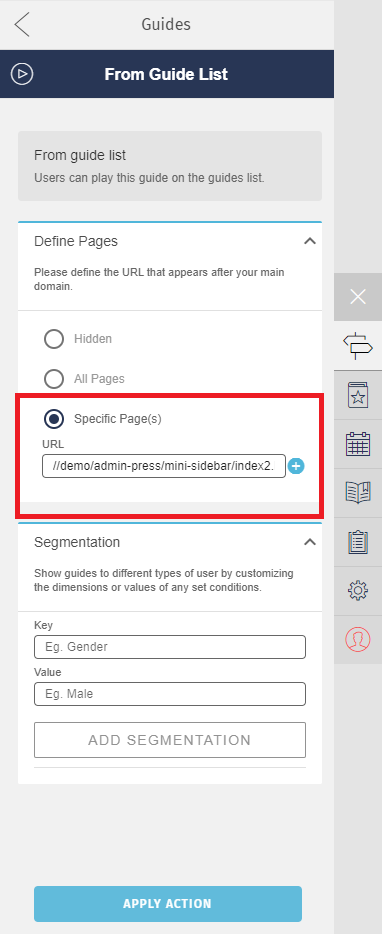
If you want your guide starting automatically in a specific URL please read this article.
There are two matching levels:
1- Helppier does not match a specific URL and the guide is available on all pages. This is done by default;
2- Helppier matches a specific URL, once this option is activated by the admin.
2- Helppier matches a specific URL, once this option is activated by the admin.
When matching a specific URL you can:
- Enable the direct match, this is by default;
- Ignore only one ID;
- Ignore everything ahead of a given point in the URL;
Example:
domain.com/pageA
It will only show guides that have been saved for “page A”.
If there is one with “page B”, it will not be shown.
If there is one with “page B”, it will not be shown.
However, we provide ways to control this more effectively.
This need exists because many platforms use dynamic parts in the URL. Such as user IDs, product IDs, etc.
There are two available ways to control the matching.
1 - Matching a dynamic URL (ignoring only one ID)
Example:
domain.com/users/2323423432/profile
To ignore the dynamic number, you can use a specific syntax.
If you configure this URL:
“/users/:userid/profile”
Helppier will try to match everything, except for the dynamic number.
The syntax is consists of using:
“:”
followed by any word.
This allows you to have several indications of dynamic parts in the URL.
Example:
domain.com/users/32343/product/223355
You should have:
/users/:userid/product/:productid
In addition to this option, we have a way to ignore everything beyond a certain point.
2 - Matching a portion of the URL
Example:
domain.com/users/32354544/profile
To have a guide available for all users and for the entire users' area, you can use:
/users/:ignore
There is another specific syntax here, it is always necessary to use
“:ignore”
Identifying this, the Helppier will ignore everything ahead of that point. Matching only with:
/users/
Comments
0 comments
Please sign in to leave a comment.