Helppier allows deleting your guides in two different ways: widget and back office.
Option 1 - Delete on Widget
Video Tutorial
1 - To delete a guide through widget you just need to login and access your guide's list.
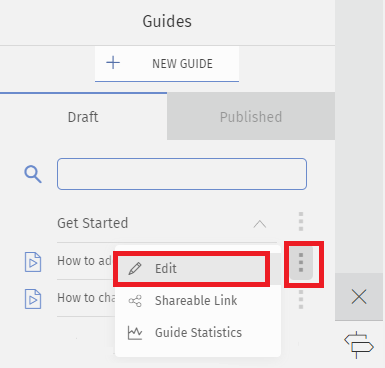
2 - Access the guide you want to delete and click on "Edit", as displayed below
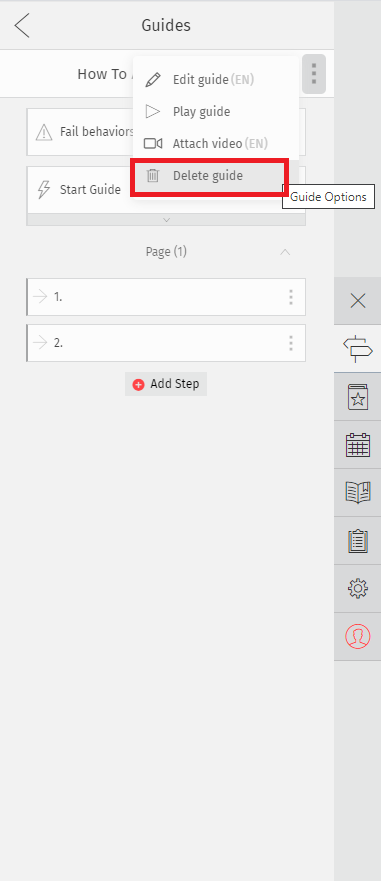
3 - The guide's step list will appear. Select the option "Delete Guide" on the top menu.
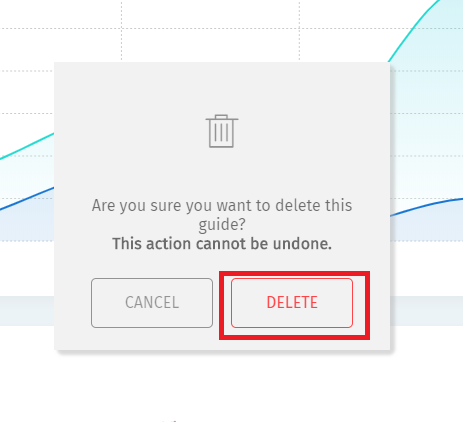
4 - A message to confirm your action will be shown. Click "Delete"
Option 2 - Delete on Backoffice
1-To delete a step through the back office you just need to login and access your Guides, in the top-left side menu.
2- A table with information about your guides will be displayed. Select the guide you want to delete by clicking on the edit icon.
3- A page with information about your guide will be displayed. On the top-right side, you will find the delete icon.
4- A message to confirm your action will be shown.

2- A table with information about your guides will be displayed. Select the guide you want to delete by clicking on the edit icon.
3- A page with information about your guide will be displayed. On the top-right side, you will find the delete icon.
4- A message to confirm your action will be shown.
Comments
0 comments
Please sign in to leave a comment.