Fail behaviors are one of Helppier’s widget’s most useful features.
They will help you ensure that, if a guide fails to start, your users will never be trapped in a dead end.
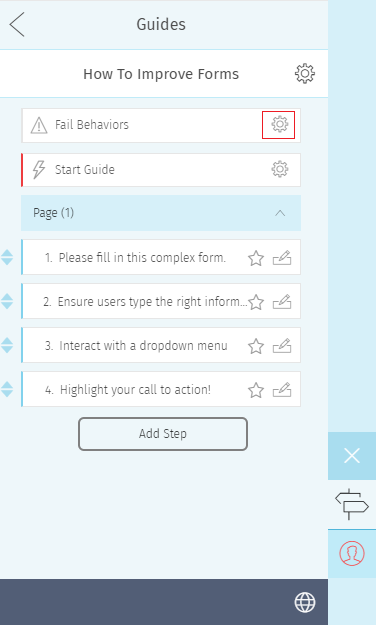
When a guide fails to play for whatever reason, this triggers an event - fail behavior. This event will then lead to one of several possible actions, that is chosen by you. These actions include:
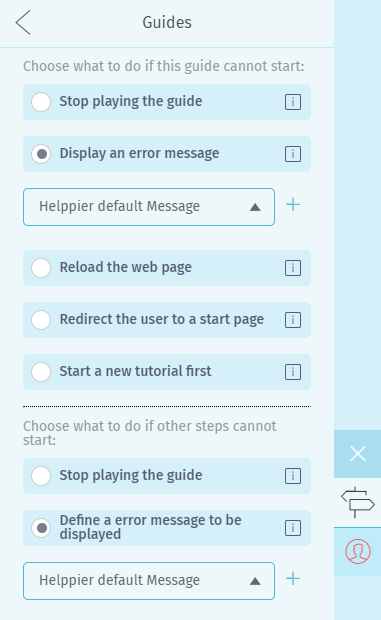
Stop playing the guide - the default setting. If a guide fails to start, it is immediately stopped.
Display an error message - you can show a custom error message to your users.
Reload the web page - the current page is reloaded in an attempt to restart the guide.
Redirect the user to a start page - the user is automatically redirected to a certain page.
Start a new tutorial first - the user is automatically taken into another tutorial. This is useful if you wish to make the user go through a specific guide before starting the guide that led to the fail behavior.
Example: In your “Contact” page, your guides list contains a “Welcome” guide that is only playable in your Homepage - as it relates to that page’s specific elements.
If your visibility settings enable that “Welcome” guide to be listed on the “Contact” page, a user is able to attempt to play it - which will result in a fail behavior.
Then, by setting up custom fail behaviors, you can choose what should happen when that fail behavior is detected.
How do I set up a Fail Behaviour?
Setting up fail behaviors is very simple, as it can be done directly from Helppier’s widget. You can find a step-by-step tutorial here.
Comments
0 comments
Please sign in to leave a comment.